Enter for a Chance to Win The Netflix Studio Kit!
Learn through a step-by-step curriculum
The fastest way to develop real skills is with in-depth expert guidance, daily practice exercises and weekly Q&A. 14 days of perfectly designed trainings to level up your skills!
How I Got Started: 5 Keys to Success
Joining the Content Creator Community
Weekly Filmmaking & Storytelling Q&A Schedule
How To Get Support Inside 14 Day Filmmaker
Introduction To Camera Gear
What To Look For When Purchasing Camera Gear
$250 Gear Budget Recommendations
$1000 Gear Budget Recommendations
$2500 Gear Budget Recommendations
The Exposure Triangle: Shutter Speed, Aperture, ISO
BONUS: Computer Buying Guide
Day 1 Practice Exercise
Lenses & Focal Lengths
Frame Rates
Day 2| Homework
Day 2| Practice Exercise "Focal Length Challenge"
Ideal Image Composition
Camera Angles
Practice Exercise
Cinematic Camera Movements
BTS: Camera Movements in Action
Practice Exercise
Fundamentals of Lighting
The Three Point Setup
Behind the Scenes: Lighting on a Budget
Practice Exercise
Recording High Quality Audio
Processing Audio
Sound Design
Practice Exercise
DOWNLOAD: Free Sound Effects
Data Management
Intro to Premiere
Keyboard Shortcuts
Practice Exercise
Step 1| Sifting Your Timeline
Step 2| Assembling Your Sequence
Step 3| Warp Stabilization
Step 4| Understanding Keyframes
Step 5| Color Correction
Step 6| Time Remapping
Step 7| Sound Design
Step 8| Exporting
Pro Tip: Create Proxies to Edit Faster
BONUS: Color Grade LOG Footage in 10 Minutes
Practice Exercise
ADVANCED: Color Grading with HSL Secondary
ADVANCED: Creating Basic Motion Graphics
ADVANCED: Learn 80% Of Video Editing In 15 Minutes
Intro to FCPX & Starting Projects
Workflow Optimization & Keyboard Shortcuts
Different Editing Workflows
Assembling Your Initial Timeline
Adding Music
Editing Together Your Story
Color Correction
Time Remapping & Speed Ramping
Sound Design
Stabalization
Keyframing Motion
Exporting Your Video
Intro to DaVinci Resolve
Downloading DaVinci Resolve
Davinci Resolve Overview
The Media Panel
The Cut Panel
The Edit Panel
Stabilizing Your Footage
Time Remapping & Speed Ramping
Keyframing Motion
Intro to Color Correction
Adding Text & Titles
Adding Music
Sound Design
Exporting Your Video
Intro to AE: Why Should I Care?
Getting to Know Your Workspace
Creating Compositions
Re-Linking Footage
The Transform Properties + Keyframes
Keyboard Shortcuts: Workflow Optimization
Intro to Animating Text
Intro to Motion Graphics
Animating Logos
How to Create & Use Motion Graphics Templates
Practice Exercise
How to Shoot 5 Commercials in 5 Hours
Breakdown of a Profitable Commercial
My Tutorial Setup: Lighting Breakdown
Practice Exercise
Planning Your Own Commercial
Commercial Scriptwriting
The First Commercial I Made For Myself
Commercial Review: Anthony's Advertisement
10 Tips For Writing A Commercial Script
Practice Exercise
70% Off 1-Day Script Program
How to Shoot Great B-Roll
How to Direct a Commercial Shoot
How to Find On Camera Talent
Practice Exercise
Editing an Interview Commercial
Practice Exercise: Seamless Transitions
Setting up Your Marketing Channels
Naming & Organizing Commercials
Exporting & Posting Videos To Youtube
Exporting & Posting Videos To Instagram
Exporting & Posting Videos To Facebook
Exporting & Posting Videos To LinkedIn
Practice Exercise
60% Off Adobe Creative Cloud
Our Favorite Transition Preset Pack (+ How to use them)
Consistent Content Creation Strategy
Using Testimonials to Scale
How to Land Travel Jobs
Creating Demo Reels (Live Review + Breakdown)
Developing a Referral System
How we shoot our videos & trainings
Small Home Office SETUP For Course + Youtube Videos
Learn through a step-by-step curriculum
The fastest way to develop real skills is with in-depth expert guidance, daily practice exercises and weekly Q&A. 14 days of perfectly designed trainings to level up your skills!
How I Got Started: 5 Keys to Success
Joining the Content Creator Community
Weekly Filmmaking & Storytelling Q&A Schedule
How To Get Support Inside 14 Day Filmmaker
Introduction To Camera Gear
What To Look For When Purchasing Camera Gear
$250 Gear Budget Recommendations
$1000 Gear Budget Recommendations
$2500 Gear Budget Recommendations
The Exposure Triangle: Shutter Speed, Aperture, ISO
BONUS: Computer Buying Guide
Day 1 Practice Exercise
Lenses & Focal Lengths
Frame Rates
Day 2| Homework
Day 2| Practice Exercise "Focal Length Challenge"
Ideal Image Composition
Camera Angles
Practice Exercise
Cinematic Camera Movements
BTS: Camera Movements in Action
Practice Exercise
Fundamentals of Lighting
The Three Point Setup
Behind the Scenes: Lighting on a Budget
Practice Exercise
Recording High Quality Audio
Processing Audio
Sound Design
Practice Exercise
DOWNLOAD: Free Sound Effects
Data Management
Intro to Premiere
Keyboard Shortcuts
Practice Exercise
Step 1| Sifting Your Timeline
Step 2| Assembling Your Sequence
Step 3| Warp Stabilization
Step 4| Understanding Keyframes
Step 5| Color Correction
Step 6| Time Remapping
Step 7| Sound Design
Step 8| Exporting
Pro Tip: Create Proxies to Edit Faster
BONUS: Color Grade LOG Footage in 10 Minutes
Practice Exercise
ADVANCED: Color Grading with HSL Secondary
ADVANCED: Creating Basic Motion Graphics
ADVANCED: Learn 80% Of Video Editing In 15 Minutes
Intro to FCPX & Starting Projects
Workflow Optimization & Keyboard Shortcuts
Different Editing Workflows
Assembling Your Initial Timeline
Adding Music
Editing Together Your Story
Color Correction
Time Remapping & Speed Ramping
Sound Design
Stabalization
Keyframing Motion
Exporting Your Video
Intro to DaVinci Resolve
Downloading DaVinci Resolve
Davinci Resolve Overview
The Media Panel
The Cut Panel
The Edit Panel
Stabilizing Your Footage
Time Remapping & Speed Ramping
Keyframing Motion
Intro to Color Correction
Adding Text & Titles
Adding Music
Sound Design
Exporting Your Video
Intro to AE: Why Should I Care?
Getting to Know Your Workspace
Creating Compositions
Re-Linking Footage
The Transform Properties + Keyframes
Keyboard Shortcuts: Workflow Optimization
Intro to Animating Text
Intro to Motion Graphics
Animating Logos
How to Create & Use Motion Graphics Templates
Practice Exercise
How to Shoot 5 Commercials in 5 Hours
Breakdown of a Profitable Commercial
My Tutorial Setup: Lighting Breakdown
Practice Exercise
Planning Your Own Commercial
Commercial Scriptwriting
The First Commercial I Made For Myself
Commercial Review: Anthony's Advertisement
10 Tips For Writing A Commercial Script
Practice Exercise
70% Off 1-Day Script Program
How to Shoot Great B-Roll
How to Direct a Commercial Shoot
How to Find On Camera Talent
Practice Exercise
Editing an Interview Commercial
Practice Exercise: Seamless Transitions
Setting up Your Marketing Channels
Naming & Organizing Commercials
Exporting & Posting Videos To Youtube
Exporting & Posting Videos To Instagram
Exporting & Posting Videos To Facebook
Exporting & Posting Videos To LinkedIn
Practice Exercise
60% Off Adobe Creative Cloud
Our Favorite Transition Preset Pack (+ How to use them)
Consistent Content Creation Strategy
Using Testimonials to Scale
How to Land Travel Jobs
Creating Demo Reels (Live Review + Breakdown)
Developing a Referral System
How we shoot our videos & trainings
Small Home Office SETUP For Course + Youtube Videos
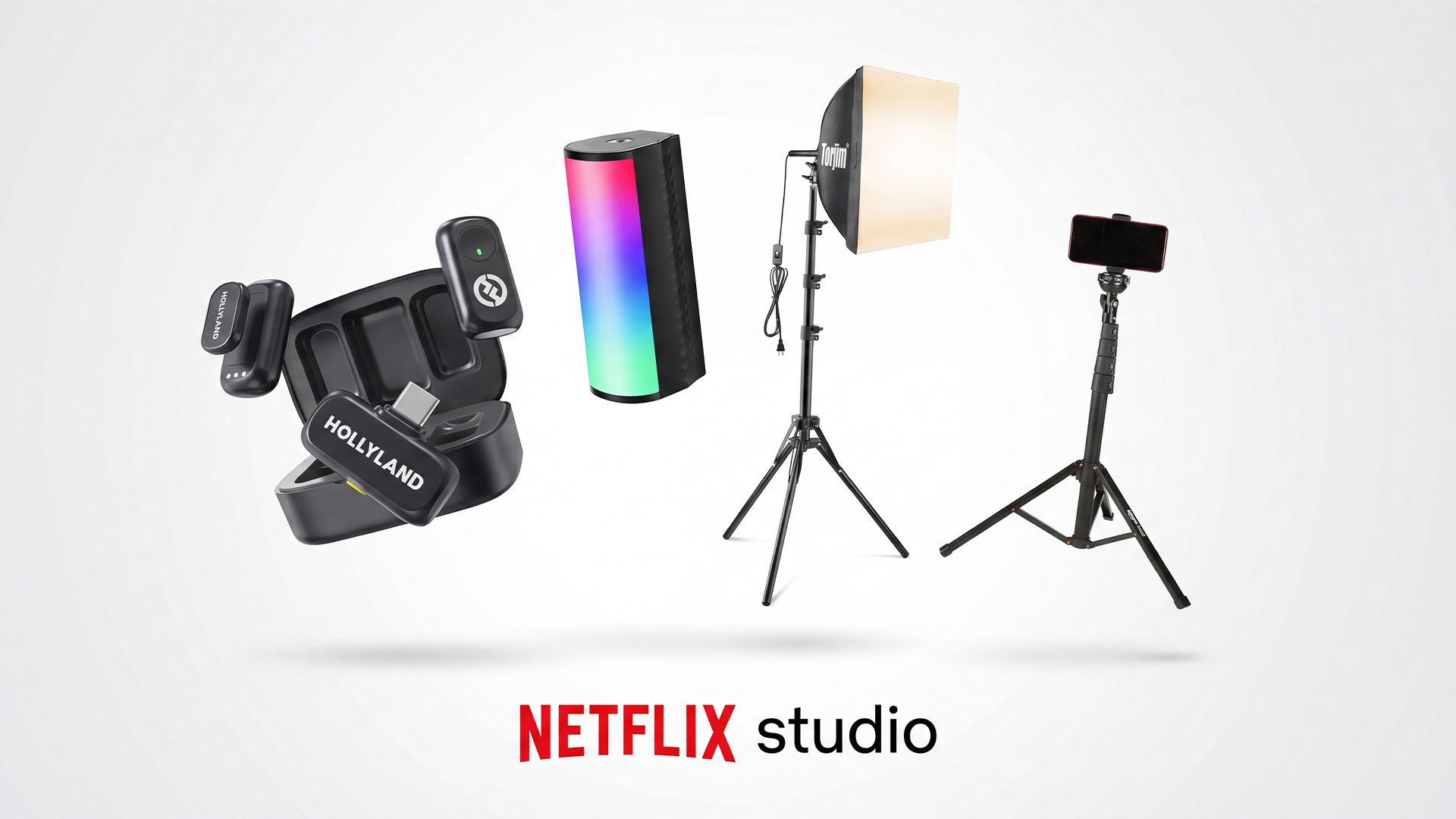
Enter for a Chance to Win The Netflix Studio Kit!

© 2026 Paul Xavier International LLC
By visiting this page, you agree to terms and conditions, privacy policy & earnings disclaimer.
This site is not a part of the Facebook website or Facebook Inc. Additionally, This site is NOT endorsed by Facebook in any way. FACEBOOK is a trademark of FACEBOOK, Inc. By submitting your email address or any other contact information you are opting in to receive marketing communication from our business in the form of emails.